

Small steps from a first note to a familiar song
Soitilo introduces one new thing at a time. You can help your child get started, then see what they have been practicing in the adult area.
Start with the very basics
A short introductory chapter helps your child find their way around the first steps. Children who already know the basics can move through it quickly.
The path is divided into short stages and chapters set in spring, summer, autumn and winter.





Learn one thing at a time
Find and hear the notes
Your child finds notes on the keyboard and listens for whether a note goes up or down.
Keep a beat and read notes
Steady beat, rhythm and reading notes are introduced in small steps, alongside familiar songs.
Explore more of the keyboard
The current path begins with the right hand on white keys. Later stages introduce black keys, sharps and flats, music with three beats in a bar, and the left hand.
Two parts to each playing task
Practice at your child’s pace
The accompaniment waits while your child works out the notes. Hints appear when they get stuck.
Play with the accompaniment
After practicing, your child plays the task with the accompaniment.
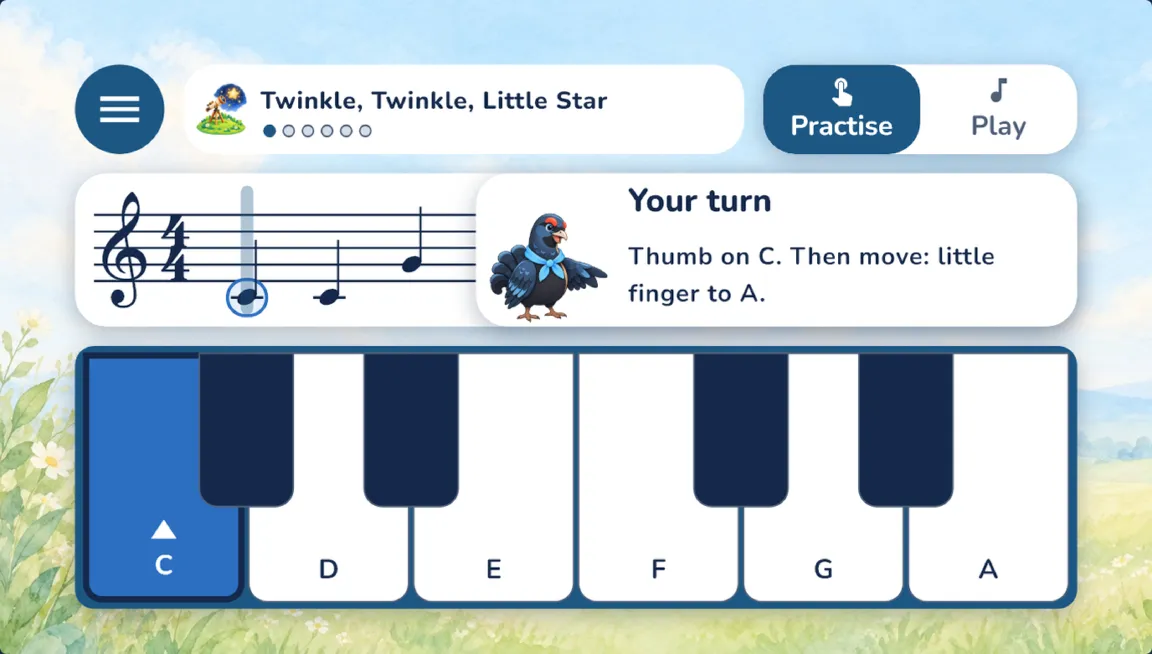

Instructions your child can listen to or read
Music Grouse gives instructions in a speech bubble, and the device can read them aloud. Each learner has a listening, reading or compact presentation style.
Short music games come between songs. In My melody and free play, children can try out musical ideas of their own.
Choose how your child plays
Use the keyboard on a phone or tablet, connect a MIDI keyboard over USB on a compatible device, or let the microphone hear an acoustic or digital piano.
Microphone sound is processed only on the device. It is never recorded or sent anywhere. Bluetooth MIDI is not supported.
After the account has been created, practice works offline. Family devices sync when they are connected.



See skills, without counting every minute
Your code opens the adult area. You can see named skills, whether your child played independently or with help, and a tip if they get stuck.
You can invite a second adult and share a learner’s progress with their piano teacher. There are no practice minutes, streaks or sibling comparisons.
The public Android release comes first; iPhone and iPad follow.